·1 min readVue.jsVueVue3CssReactivityDynamic Styles
Vue 3 State to Your CSS with v-bind()
Wire component props into scoped CSS with Vue 3's v-bind() in the style block. Handy for theme tokens without inline styles everywhere.
You probably already bind state to classes in the template. Vue 3 also lets you pipe that same state into CSS inside <style scoped> with v-bind().
Here's a small grid of boxes from App.vue:
<template>
  <div class="custom-wrapper">
    <Box v-for="i in 35" :key="i" />
  </div>
</template>

<script setup>
import Box from "./components/Box.vue";
</script>

<style scoped>
.custom-wrapper {
  display: flex;
  justify-content: center;
  flex-wrap: wrap;
  max-width: 1260px;
  gap: 10px;
}
</style>
Box.vue starts plain:
<template>
  <div class="custom-box"></div>
</template>

<style scoped>
.custom-box {
  display: inline-flex;
  height: 50px;
  width: 50px;
  background: gray;
}

.is-done {
  background: #ffcd05;
}
</style>
Add a color prop with a default:
<script setup>
defineProps({
  color: {
    type: String,
    default: "#ffcd05",
  },
});
</script>
Then reference it in CSS:
<style scoped>
/* code omitted */
.is-done {
  background: v-bind(color);
}
</style>
Vue compiles that into a hashed custom property on the root element and keeps it reactive. You're not sprinkling inline styles on every box.
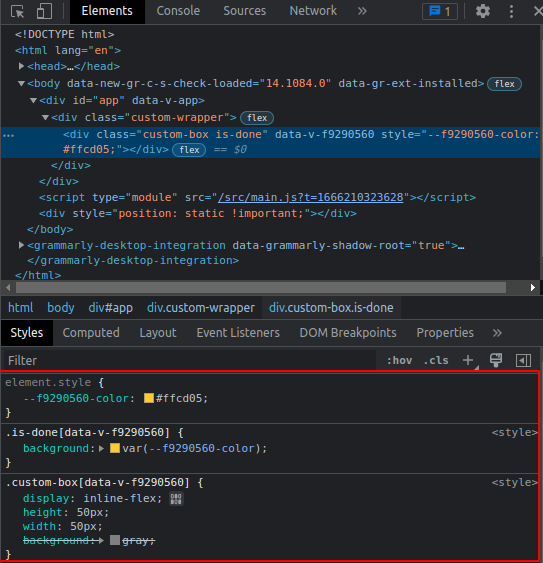
That's the whole trick. Static-looking CSS, dynamic values when the prop changes.